
How to Use AI for Your Resume as a Former Pastor
Read Time: 4 minutes

Todd Linder
Founder & Head Coach
Overview
Almost every former pastor in a career transition has typed some version of "write me a resume" into ChatGPT or Claude. What comes back looks polished, but it rarely leads anywhere. The problem isn't the tool, it's how most people point it.
This guide breaks down the right way to do it: treat the tool as an analyst that runs a resume analysis against a real opening and surfaces your transferable skills, not a machine that invents generic bullets for you. You'll get a repeatable process for landing corporate jobs after ministry, a ready-made resume prompt, and a checklist you can run today.
Today's Ministry To Marketplace Minute:
Mindset Shift: I hate AI for writing resumes for former pastors.
Strategy Shift: The better way to create resumes for your secular job search.
Do This Right Now: Create your new AI tool and make better resumes.
Who Will Hire Me?: 5 ministry friendly organizations with jobs for ex-pastors.
🧠 MINDSET SHIFT: Should Former Pastors Use AI to Write Their Resumes?
Here's the short answer: not directly, and not the way most people are doing it. Roughly 90% of job seekers now lean on some kind of automated tool somewhere in their search, yet most former pastors we talk to describe the same outcome: 50 to 100+ applications sent out during a career transition, and only 3 to 4 interviews to show for it. That gap isn't a technology problem. It's a strategy problem.
When you ask a chatbot to "write my resume," it generates text based on what thousands of other resumes look like. It has no idea what your target employer actually needs, so it defaults to generic phrasing: "results-driven leader," "excellent communication skills," "passionate about people." Everyone using the same prompt gets nearly identical language back. Your pastoral experience, which is genuinely distinctive, gets flattened into the same template as everyone else's.
The fix isn't to abandon the technology. It's to stop treating it as a writer and start treating it as an analyst. Instead of generating content from a blank page, you can put it to work comparing your actual background against a specific opening, spotting the overlap a hiring manager cares about, and telling you exactly where your materials are thin. That shift, from generator to analyst, is what separates a resume that sounds fine from one that gets a callback.
♟️ STRATEGY SHIFT: The Better Way to Use AI for Your Resume After Ministry
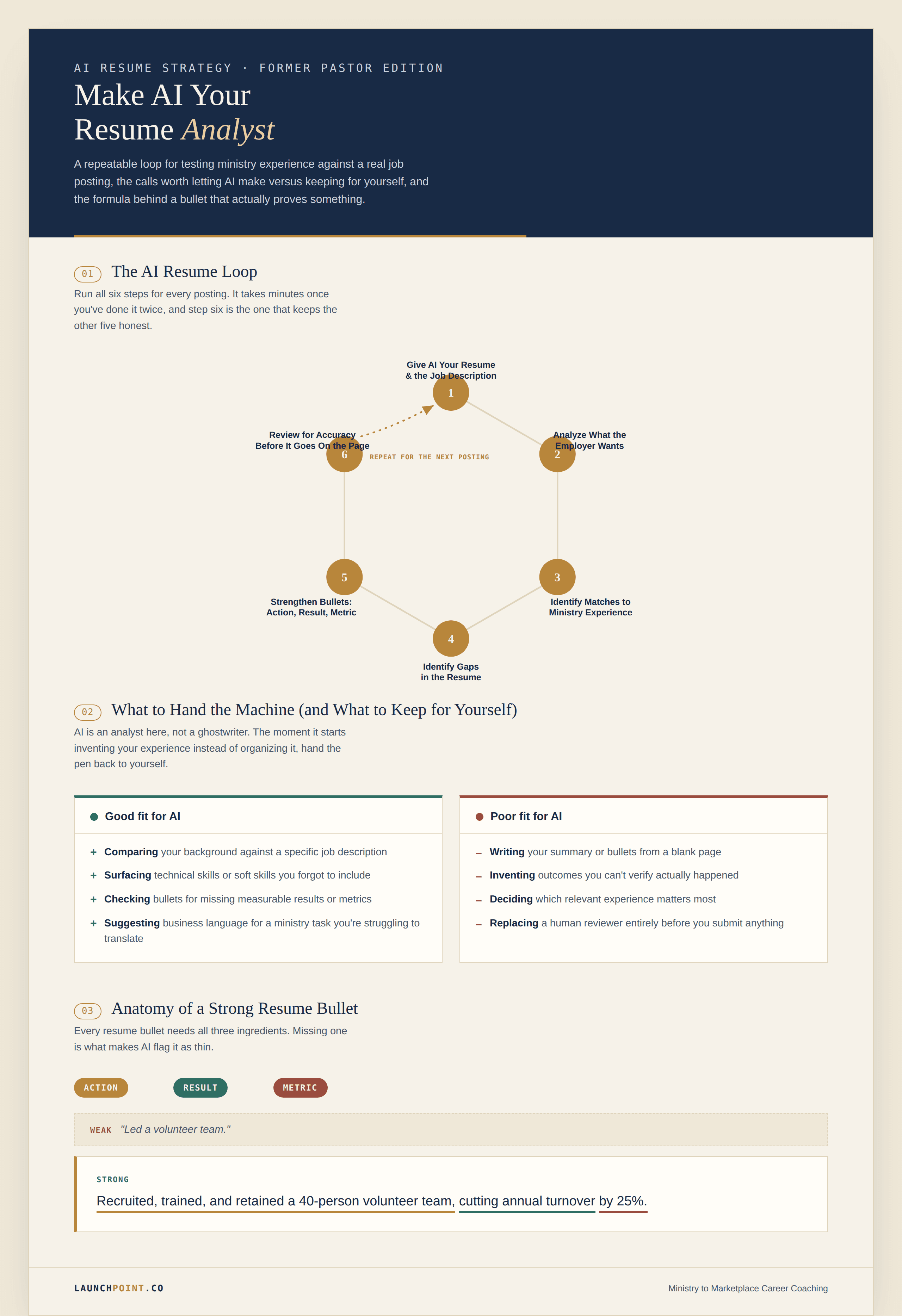
This comes down to treating every application as its own small research project. Instead of one all-purpose document, you run a round of resume tailoring on each opening, and it only takes minutes. Coaches inside the Interview Accelerator program who follow this process report 90%+ keyword matches to the posting and an application-to-interview rate near 33%, well above the industry norm.
Step 1: Give AI Your Resume and the Target Job Description
Start every tailoring session the same way: paste your current draft and the full text of the posting into the same conversation. Don't summarize it yourself. Paste the whole listing, including the "nice to have" section most applicants skip, since that's often where the real requirements are hiding.
Step 2: Ask AI to Analyze What the Employer Actually Wants
Once both documents are in front of it, ask it to break the opening down into its actual components: the problems the role exists to solve, the actions the person will take day to day, how success will be measured, and the required versus ideal technical skills and soft skills. This is qualitative analysis, not resume writing, and it's the step most job seekers skip entirely.
Step 3: Identify Matches Between Your Ministry Experience and the Job
Next, have it cross-reference that breakdown against your actual background. This is where an AI tool earns its keep for a former pastor: it can flag which parts of your ministry experience already map to what the employer stated, even when your draft still describes that experience in church language instead of business language. Leading a volunteer team, managing a budget, or resolving conflict between staff are all transferable skills and relevant experience for plenty of corporate jobs that have nothing to do with ministry.
Step 4: Identify Gaps in Your Resume
Ask directly: "based on this posting, what's missing here?" A good resume analysis will surface both hard experience gaps (a required certification or software you haven't listed) and soft ones (a competency the employer clearly cares about that your bullets never mention). Not every gap needs to be filled by rewriting your background. Some just need to be named in language the employer already recognizes.
Step 5: Strengthen Resume Bullets With Actions, Results, and Metrics
Weak resume bullets describe a responsibility. Strong ones describe measurable results. For each line it flags as thin, ask for a check on three things: an action describing what you actually did, the result that came from it, and a number that shows the size of that result. "Led a volunteer team" becomes "Recruited, trained, and retained a 40-person volunteer team, cutting annual turnover by 25%." That single change turns a duty into evidence.
Step 6: Review Every AI Recommendation for Accuracy
Before anything goes on your resume, read it against what actually happened. A model will occasionally round up: it might suggest a metric that sounds plausible but that you never tracked, or reframe a task into something slightly bigger than it was. You know your pastoral experience better than any chatbot does, so treat every suggestion as a draft to verify, not a fact to trust. Overstating what you did will cost you far more in an interview than a modest, accurate bullet ever will.
You can get tailored resume feedback through the Interview Accelerator's coaching program if you want a second set of eyes before you send anything out.
AI Resume Prompt for Former Pastors
Rather than starting from a blank conversation every time, save the following as a reusable resume prompt so you can run the process above in minutes instead of starting over for every application.
Three-step setup:
Create a new project in Claude (or a saved prompt in whichever tool you use).
Name it something you'll recognize later, like "Resume Reviewer."
Paste the prompt below into the project's instructions, then attach your draft and a job description each time you use it.
Review my resume against the attached job description for a former pastor moving into a corporate role. First, break the posting into its problems, actions, expected results, required technical skills, and required soft skills. Second, compare my materials against that list and identify which existing experience already matches, even if it's currently described in ministry language. Third, list any real gaps my background doesn't currently address. Finally, review each bullet for three components: an action, a result, and a metric, and suggest a revision for any bullet missing one of those three.
Keep this wording steady across applications. The only things that should change each time are the draft you paste in and the posting.
What AI Should (and Shouldn't) Do for Your Resume
A good AI resume tool is a strong fit for:
Running a resume analysis against a specific job description
Surfacing technical skills or soft skills you forgot to include
Checking bullets for missing measurable results or metrics
Matching resume keywords to what an applicant tracking system (ATS) actually scans for
Suggesting business language for a ministry task you're struggling to translate
It's a poor fit for:
Writing your summary or bullets from a blank page
Inventing outcomes you can't verify actually happened
Deciding which relevant experience matters most (that judgment call is still yours)
Replacing a human reviewer entirely before you submit anything
Used the first way, it shortens the hours you'd otherwise spend on manual resume tailoring for every posting. Used the second way, it produces a document that reads like everyone else's.
✅ DO THIS RIGHT NOW: Build Your AI Resume Checklist
Set up your tool: start a Claude project or saved prompt, and paste in the resume prompt above
Pull one real posting you're planning to apply to
Ask it to break down the posting's problems, actions, results, and required skills
Cross-reference your current draft against that breakdown to spot matches and gaps
Rewrite at least three bullets using the action, result, and metric format
Read the finished version yourself before you submit it, and cut anything you can't back up in an interview
FAQs
Should former pastors use AI to write their resumes?
Not entirely. It's most useful for former pastors when it's used to analyze a resume against a job description rather than to write one from scratch, since machine-generated drafts tend to sound generic and can miss what makes a pastor's background genuinely relevant.
What is the best way to use AI for a resume?
The best approach is to feed it both your current draft and the specific job description you're applying to, then ask it to identify matches, flag gaps, and strengthen weak bullets with actions, results, and metrics. A trusted coach or mentor can add a layer of resume feedback that automated review alone won't catch.
Can AI help translate ministry experience into corporate language?
Yes, it can help translate ministry experience into corporate language once it understands the opening you're targeting, since it can suggest business terminology for tasks like leading volunteers, managing a budget, or resolving conflict.
Can AI help identify transferable ministry skills?
It can help identify transferable skills by comparing your ministry background against the technical skills and soft skills a posting asks for, though you should always verify its suggestions against what you actually did.
How can you use AI to tailor a resume to a job description?
To tailor a resume to a job description, paste both documents into the same conversation, ask for a breakdown of what the employer wants, work in the resume keywords that breakdown surfaces, and revise your bullets to reflect the matches it finds.
🚀 FROM THE COACHING GROUP
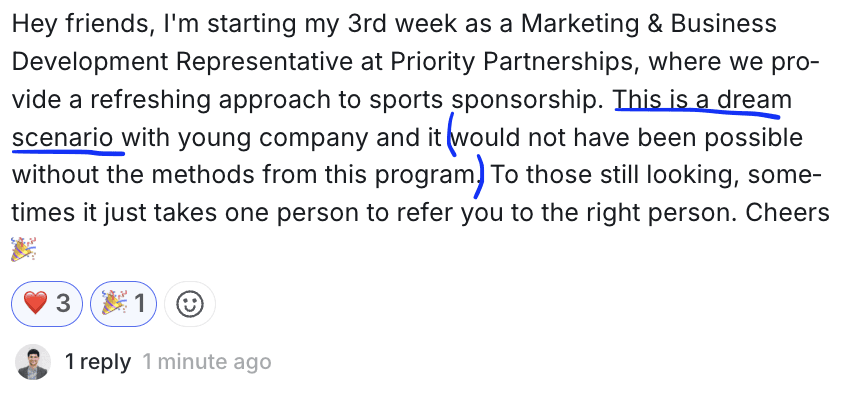
This is a dream scenario with a young company and it would not have been possible without the methods from this program. To those still looking, sometimes it just takes one person to refer you to the right person. Cheers!
🤝 WHO WILL HIRE ME?: 5 ministry friendly organizations with jobs for ex-pastors.
Because of the time sensitive nature of job postings, we post these in the email newsletter only.
Get the newsletter, along with 1400+ others, every Friday morning.


How we can help you:
FREE Ultimate Guide To Your Ministry To Marketplace Transition Our entire process in a free (yes, FREE) guide that walks you step-by-step through the essentials of landing a marketplace job that you'll enjoy, and supports your family. Each section builds on the next: clarity, translation, resume, and LinkedIn connections… everything you need to start seeing traction in your search. You can sign up here >>> Sign up for the Ultimate Guide.
The Ministry To Marketplace Interview Accelerator Join 162+ others who have successfully transitioned from ministry into marketplace jobs that value their experience. The Interview Accelerator will give you our proven step-by-step process, coaching, and community for getting more interviews for jobs that value your ministry experience and support your family. Let's hop on a call!
Was this forwarded to you? Get this newsletter into your inbox, along with 1400+ others, every Friday morning. Subscribe here.